We build web applications with sign-in, roles, billing and an audit trail from the first version, on a stack whose monthly cost you know before we start.
A web application is software your customers or your team sign in to: a portal, a dashboard, a booking system, a product with paid plans. Web application development services differ from building a website in one way that matters. People trust the application with their data and their money.
That changes what a first version must contain. Screens are the visible part. Who may see what, how a payment renews, and what was changed by whom are the parts that hurt when they are added later. We build those in from the start, and we run a product of our own on the same foundations.
What is inside
Six layers under every screen.
This is how an application is put together, from what people see down to what records it. Select a layer to see the rule it follows and how it exists in a product we built and run.
Screens
What it is
Customers and staff rarely need the same screens. A customer app and a staff back office are usually two applications over one set of data, so each can be simple.
The rule it follows
An application covered by the European Accessibility Act has had to meet its accessibility rules since 28 June 2025. E-commerce services are among those covered when you sell to consumers in the EU; the Act exempts micro-enterprises that provide services. This is general information, not legal advice.
European Commission, European Accessibility Act
In our own product
A customer app, a staff back office and a documentation site, kept in one codebase so they share the same data and components.
Sign-in
What it is
Accounts, passwords, sign-in with Google, and a second step for every staff account.
The rule it follows
The UK’s National Cyber Security Centre recommends multi-factor authentication for online services: it adds a layer of security, so that a compromised password alone is not enough.
NCSC, multi-factor authentication guidance
In our own product
Customers sign in with email or Google. Staff need a second factor before they reach the back office.
Data rules
What it is
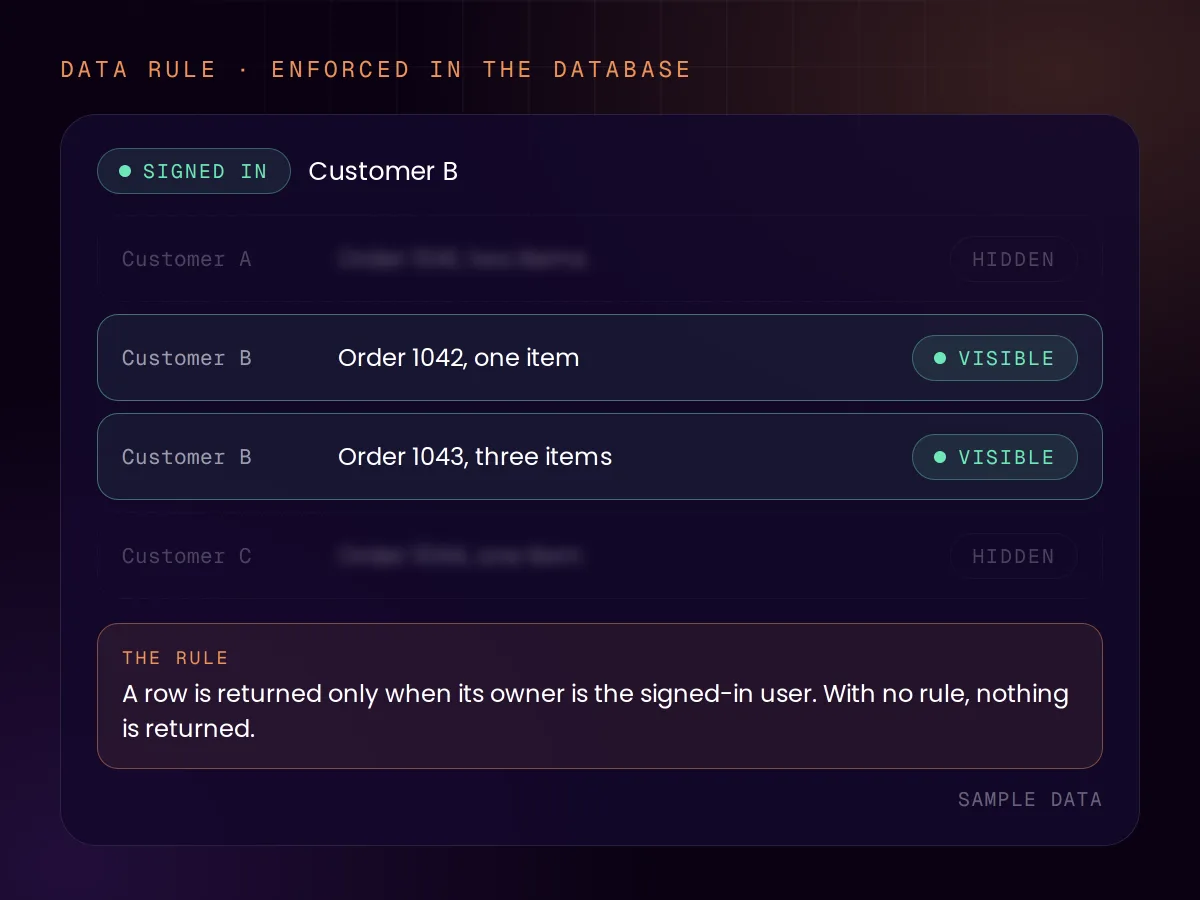
The rule that customer A never sees customer B’s records. We put it in the database itself, not only in the screens, so a mistake in one screen is not enough to leak data.
The rule it follows
“Row security policies restrict, on a per-user basis, which rows can be returned by normal queries.” If no policy exists, “a default-deny policy is used”. Broken access control is the first entry in OWASP’s Top 10 for 2025.
PostgreSQL documentation; OWASP Top 10:2025
In our own product
Access rules are enforced in the database, and staff roles decide who may see and change what in the back office.
Billing
What it is
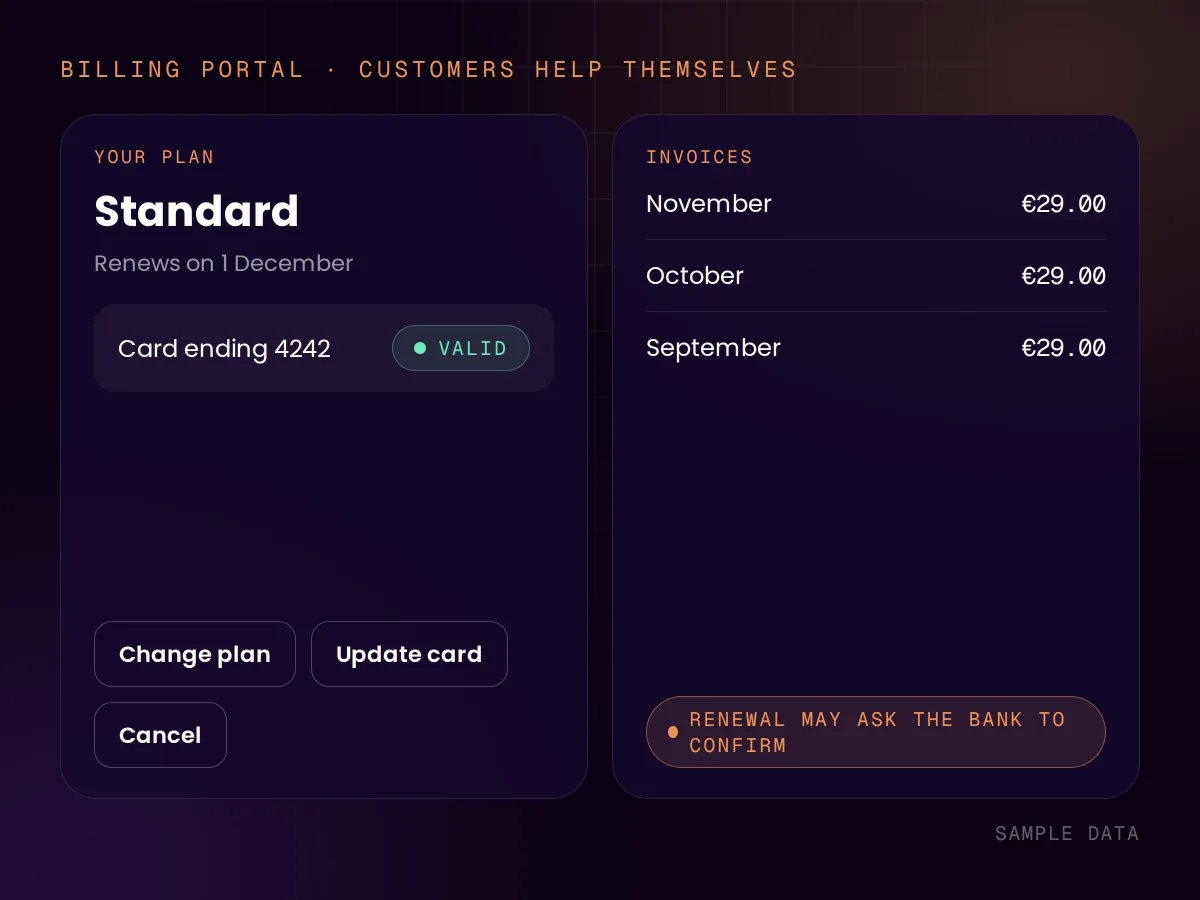
Plans, subscriptions, invoices and the awkward cases: a card that expires, a renewal the bank wants confirmed, a customer who wants to cancel at the end of the period.
The rule it follows
European card payments require strong customer authentication, and a renewal “might require your customer to re-authenticate, even if they authenticated in the past”.
Stripe, Strong Customer Authentication
In our own product
Paid plans and identity checks run through Stripe. Customers change their card, download invoices and cancel in a billing portal, without writing to support.
Background work
What it is
Scheduled jobs, emails in and out, and messages from other systems. This is where an application talks to the outside world, and where most quiet failures happen.
The rule it follows
Stripe states that its messages can arrive more than once and not in the order they were created, and expects the receiving application to cope.
Stripe, webhooks documentation
In our own product
Scheduled jobs run in small batches that resume where they stopped, and a failed email is retried before a person is alerted.
Audit trail
What it is
A record of every change a staff member makes. It is dull until the day a customer disputes something or a mistake has to be traced.
The rule it follows
Security logging and alerting failures are entry A09 in OWASP’s Top 10 for 2025.
OWASP Top 10:2025
In our own product
Every change made in the back office is logged with who made it, and security events are recorded separately.
Rules quoted from each publisher’s own documentation, read on 15 November 2026. “Our own product” is a subscription service we built and operate.
Custom software is the expensive option. If a product that already exists does what you need, buy it. We would sooner tell you that than build something you could have rented.
Build it
The application is the product you sell.
Your process is the thing that sets you apart, and no tool fits it.
You have outgrown a tool and are paying for workarounds every month.
Customer data has to stay in accounts you own.
Buy it instead
It is something every business needs: invoicing, a CRM, a help desk.
An existing product covers most of it, and the rest is habit.
You are not yet sure the idea has customers.
Nobody in the business has time to own it after launch.
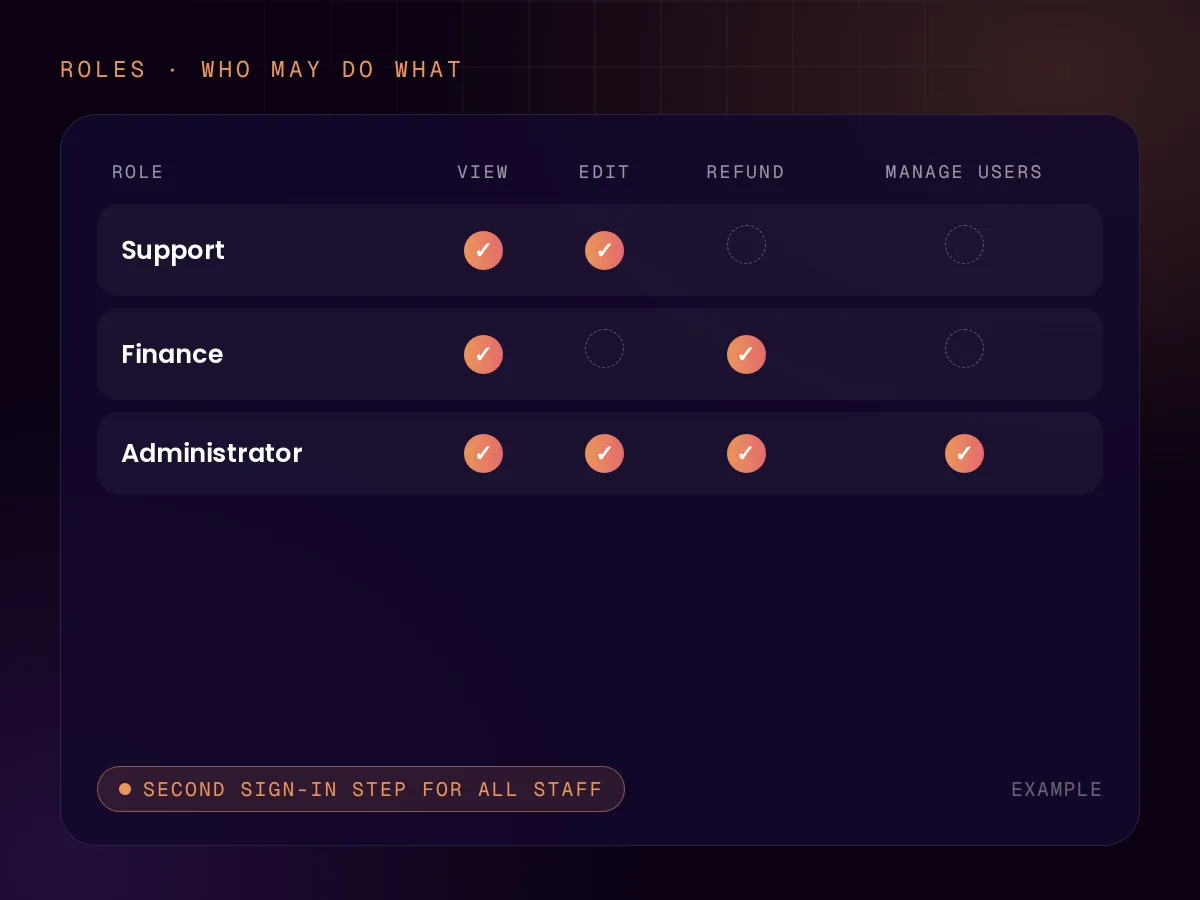
Most applications start with one kind of user and discover the second kind three months in: a manager, a support agent, an accountant. Adding roles afterwards means revisiting every screen.
We define the roles in the scope, even when version one uses only two of them, and every staff account signs in with a second step. The roles then decide what each screen shows and what each button may do.
The first payment is the easy one. The work is in everything after it: a renewal the bank wants the customer to confirm, a failed card, a plan change in the middle of a month, a cancellation that should take effect at the end of the period.
We use Stripe for this and its hosted customer portal, where customers update their payment method, download invoices and cancel on their own. Your application listens for what Stripe reports and keeps its own records in step.
Plans, renewals and failed payments
A portal where customers help themselves
Your records kept in step with the payment provider
The usual way to protect data is to check in each screen whether the user may see it. One forgotten check and the data is out. We also write the rule into the database, where it applies to every query, whichever screen it came from.
Data protection law asks for this kind of thinking. The UK regulator’s guidance on data protection by design says you must put measures in place so that, by default, you only use the personal information necessary for your purpose. This is general information, not legal advice.
A first version ships when it is small. These are the things we advise cutting, and adding only when real users ask.
A separate mobile app
A web application that works well on a phone comes first. An app in the stores is a second project.
A setting for everything
Every option is a screen to build and a case to test. Pick the sensible default and move on.
Dashboards and reports
Start with an export. Build the report people actually open, once you know which one that is.
Every integration
Connect the one system the application cannot work without. The others can wait for demand.
More roles than you have people
Design for roles, build two. The third is added when someone needs it.
A second language
Built so it can be added, and added when there are users who need it.
Running cost
What it costs to keep running.
The build is paid once. These are the monthly bills of the stack we use, as its vendors publish them. When the accounts are in your name, you pay them directly.
Part
Database and sign-in (Supabase)
To try it
Free. A free project is paused after a week without activity.
In production
From $25 a month.
What that covers
The database, sign-in and file storage, with daily backups kept for 7 days.
Part
Hosting (Cloudflare Workers)
To try it
Free, up to 100,000 requests a day.
In production
$5 a month, with 10 million requests included.
What that covers
Running the application and its scheduled jobs.
What it costs to keep running.
Part
To try it
In production
What that covers
Database and sign-in (Supabase)
Free. A free project is paused after a week without activity.
From $25 a month.
The database, sign-in and file storage, with daily backups kept for 7 days.
Hosting (Cloudflare Workers)
Free, up to 100,000 requests a day.
$5 a month, with 10 million requests included.
Running the application and its scheduled jobs.
Prices as shown on each vendor’s own pricing page on 15 November 2026, in US dollars. Usage above the included amounts is billed by the vendor, and a payment provider charges its own fee per payment. Maintenance of the application is separate.
The users, the roles, the one job the application must do well, and the list of what waits.
02 · Ship
Get it in front of users
A working first version with sign-in, roles and the core job, on real data.
03 · Harden
Make it safe to rely on
Data rules in the database, the audit trail, billing edge cases and the checks that run on every deploy.
04 · Run
Hand over, or keep us on
You get the documentation, and the code on full payment. Changes and upkeep are available as an optional monthly sprint.
Price
Quoted per application
We quote from the scope, fixed and agreed before we start, with the monthly running cost in the same quote. For UK clients we quote in pounds on request. See all pricing
Designing and building software that people sign in to through a browser: portals, dashboards, booking systems, products with paid plans. Web application development services include the parts users never see, such as who may access what, how payments renew and what gets logged.
We quote each application from its scope, fixed and agreed before we start. The same quote states the monthly running cost. As a guide, the database we use starts at $25 a month in production and the hosting at $5 a month.
Buy when it is something every business needs, or when an existing product covers most of it. Build when the application is what you sell, or when your process is what sets you apart and no tool fits. We tell you which side you are on.
Sign-in, the roles you need, the one job the application must do well, and the rules that protect the data. It should leave out the separate mobile app, the settings for everything and the reports nobody has asked for yet.
The access rule is written into the database as well as into the screens. A query can only return the rows the signed-in user is allowed to see, and nothing is visible until a rule allows it.
Nuxt or Next.js for the application, Supabase for the database and sign-in, Stripe for payments and Cloudflare for hosting. These are the same foundations as the product we run ourselves.
The code we write for you becomes yours on full payment, and we transfer the repository when you ask. Our own reusable tools, such as the integrity check, stay ours, and you keep the right to use them. The database, hosting and payment accounts can be in your own name from the start.
The application is yours and keeps running. Changes, security updates and upkeep are available as an optional monthly sprint, or your own developers can take it on with the documentation.