CRM
Website and quote forms that arrive in the CRM as a lead, after spam has been filtered out.

We connect your CRM, payments, email and data in code. Every integration is built for the day a message arrives twice, arrives late, or the other side changes its API.

What it is
Connecting two systems takes an afternoon: one sends, the other receives. API integration services earn their fee on everything after that. The message that is sent twice. The one that arrives when your side is down. The vendor that changes its API with a few months of notice.
We build integrations in code, with those cases handled from the start. Some are simple, such as a website form that lands as a lead in a CRM. Some carry money, such as payments and subscriptions. The care is the same.
Where it breaks
None of these are our opinion. Each is written in the documentation of the systems you would connect. Select one to see what the vendor says and what we build against it.
Receive
“Webhook endpoints might occasionally receive the same event more than once.”
Stripe, webhooks documentation
What we build
Every incoming event is recorded by its own id before anything else happens. A repeat is recognised and skipped, so the same event is not acted on twice.
In something we run
In a subscription product we built, each payment event is stored once by its id. If it cannot be stored, we tell the sender it failed, so it is sent again.
Quotations from each vendor’s own documentation, read on 15 November 2026. The examples are from products and systems we built and operate.
Sources: Stripe, webhooks (opens in a new tab), Pipedrive, rate limiting (opens in a new tab), HubSpot, private apps (opens in a new tab), HubSpot, date-based API versioning (opens in a new tab), Salesforce, API end of life (opens in a new tab)
What we connect
Each of these runs today in a client site, in one of our own products or in our own operations.
Website and quote forms that arrive in the CRM as a lead, after spam has been filtered out.
Stripe checkout, subscriptions, invoices and identity checks, with the payment events handled as described above.
Outgoing mail, incoming replies read back into the system, and delivery events that say what bounced.
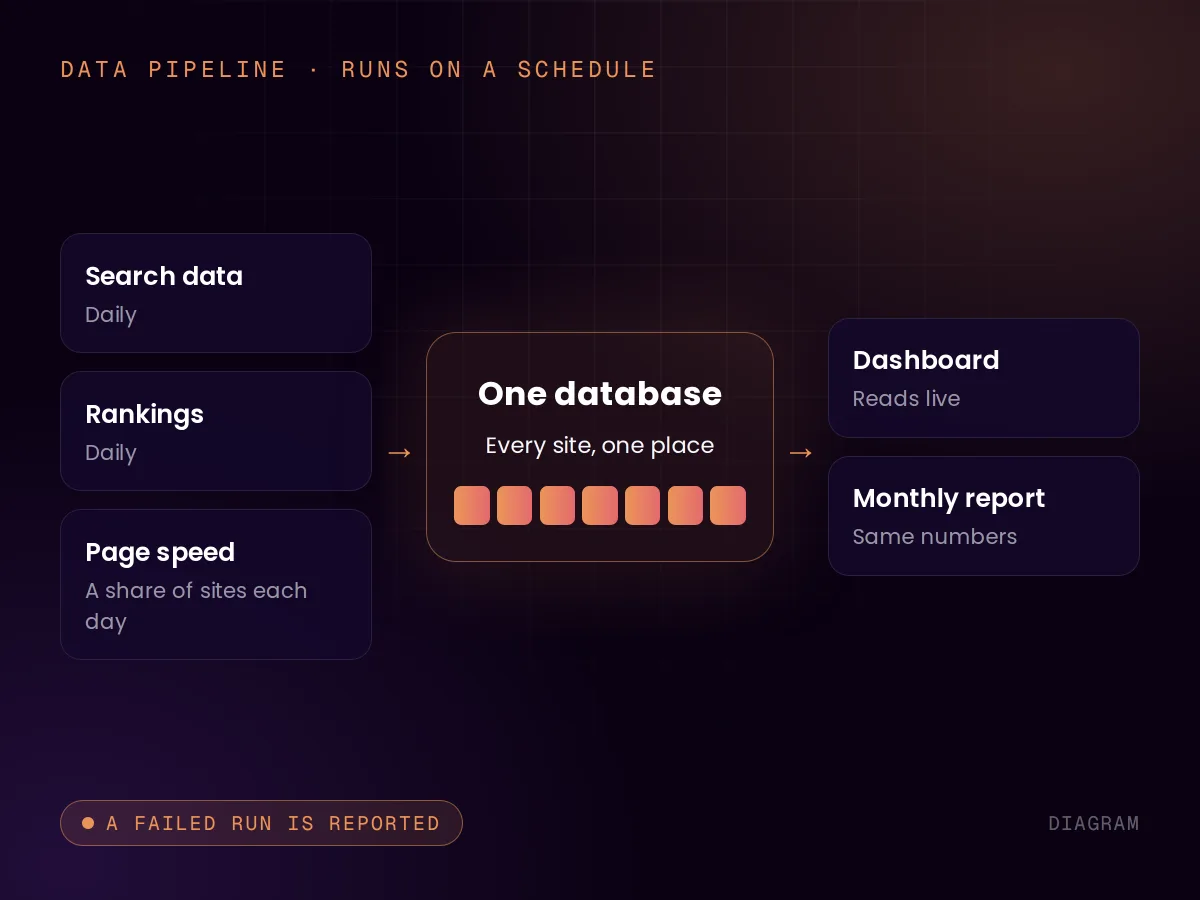
Search Console, PageSpeed, Analytics and Ads pulled on a schedule into one database.
Messages to the team’s chat or task board when something needs a decision, limited so the same alert is not repeated.
Language models and web-search services called from code.
Beyond one connection
Data pipelines
A data pipeline is an integration on a timer: collect from several sources, clean it, put it in one place, and repeat. Ours pulls search data, rankings and speed measurements for the sites in our SEO system into one database, which the dashboards and the monthly reports then read.
The engineering is in the limits. Our hosting platform stops a scheduled job after fifteen minutes, and one of our jobs outgrew that. We split it so it handles a share of the sites each day and every site is still covered each week. A pipeline that silently stops halfway is worse than no pipeline.
Internal tools
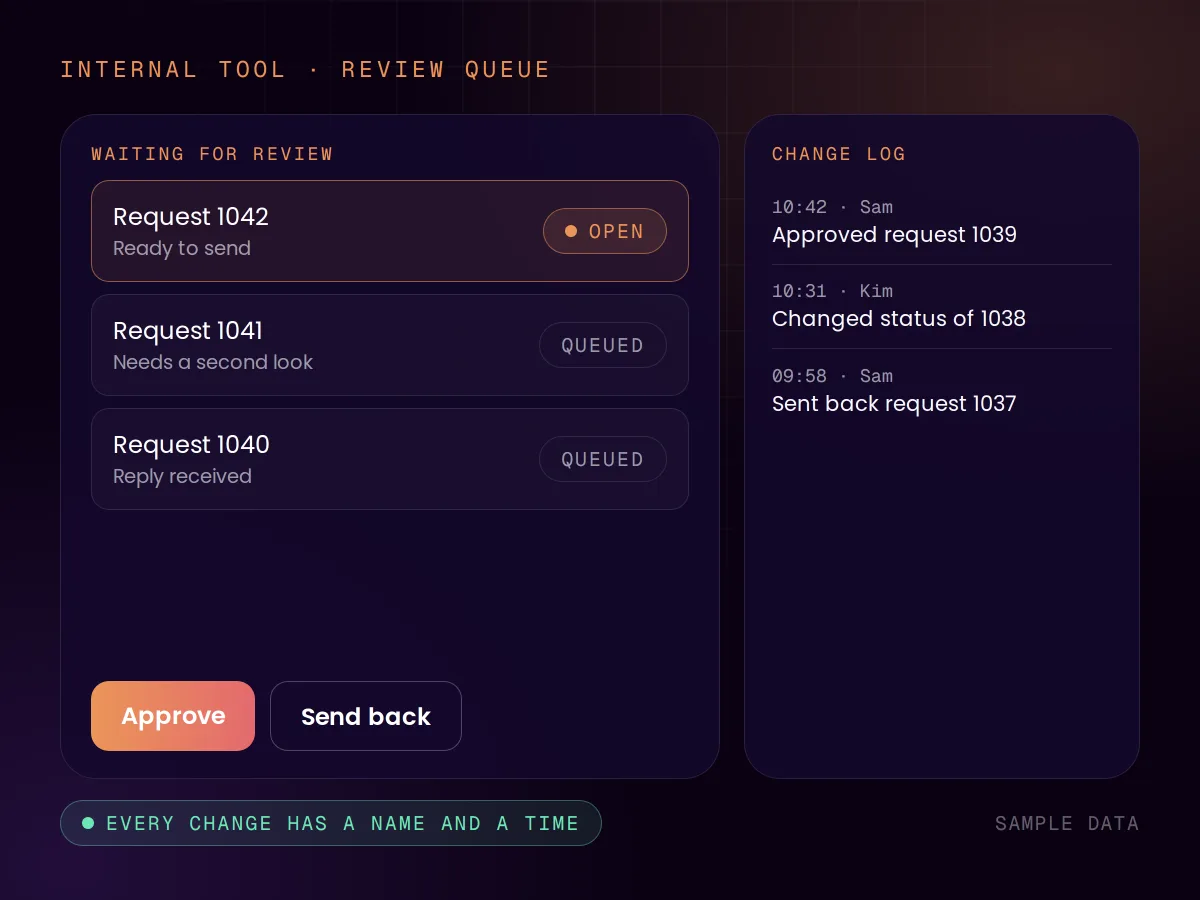
An internal tool is the screen your own team works in: review a queue, approve, send, look up a customer. We built one for a subscription product of ours, where staff handle requests, customers, billing and identity checks, and one for our clients, who see their leads and reports in it.
What a spreadsheet cannot give you is a record. In the back office we built, every change a staff member makes is logged with who made it. In the spreadsheet audits collected by researcher Raymond Panko, errors turned up in 24% of the spreadsheets overall, and in most of those examined in the later, more thorough audits. Fixed fields and a log do not stop mistakes, but they make each one traceable.
Sources: Cloudflare, platform limits (opens in a new tab), Panko, Spreadsheet Errors: What We Know (opens in a new tab)
Code or platform
We have built both: an outreach system on an automation platform, with manual checkpoints, and payment and email flows in code. The choice depends on what happens when it goes wrong.
Keys and data
An integration holds the credentials to your systems. This is general information, not legal advice.
Sources: OWASP API Security Top 10, 2023 (opens in a new tab), ICO, contracts between controllers and processors (opens in a new tab)
How we work
01 · Map
Which system sends what, when, and what must never happen twice. The vendors’ limits and version dates go on the same page.
02 · Build
Receive, verify, store, process. Built in code by default, on a platform when that is the better fit.
03 · Break
Send it twice. Send it late. Take the other side down. An integration is tested on what goes wrong, not on the happy path.
04 · Run
You get the documentation, and the code on full payment. Watching the vendors’ changes is part of the optional monthly sprint.
One integration
€500 – €5,000
Fixed and agreed before we start. Where it lands depends on the systems involved and on what a failure would cost. For UK clients we quote in pounds on request. See all pricing
Proof
 Content-protection SaaSAMP Content Protection6applications in one monorepo500+known leak and piracy sites scanned3paid plans via StripeView case
 Autonomous SEO systemAgentic SEO6specialised SEO agents1.9M+keyword tracking records12,000+keywords processedView case
 Children’s book discovery platformWau Books60books published in the catalogue4age bands, from 0 to 12 years36categories across age, language, format and themeView case
FAQ
Reviewed by Chris de Gruijter,
Further reading
We also do
Start with the free AI Scan, or tell us what should be connected and ask for a quote.