One action, many names
The same lead had four different names across the sites, and on one site no name at all. Every setup becomes a one-off and nothing can be compared.

We audit Google Analytics, Tag Manager and consent on your site, fix what is miscounting, and show you why your numbers disagree with each other.

What it is
Your CRM says 40 leads. Google Analytics says 47, or 27. Google Ads says 31. Each number is produced by a different system with its own rules, and most businesses end up trusting none of them.
As your Google Analytics consultant we do the unglamorous part: read the tag setup, the site’s code and the live data side by side, find where they drifted apart, and fix it. You keep every account. We work in yours.
Why numbers disagree
The same leads, counted four ways. Select a count to see why it is off. None of this is unusual: it is what a normal setup looks like before anyone checks it.
Leads in one month (sample data)
7 too many
Why it differs
More leads than exist. Double counting is hiding the visitors who refused consent, so the total looks plausible while both errors are still in it.
Usual causes
Sample figures to show the pattern, not a client’s data. The causes are the ones we found in our own audits and the ones Google documents.
Sources: Google, consent mode (opens in a new tab), Google, behavioural modelling (opens in a new tab), Google, attribution (opens in a new tab), Google, key events and conversions (opens in a new tab)
What we find
We audited the tracking on five websites we manage. The page-level foundation was right on all five. The event layer was not right on any of them. These are the patterns, without names.
The same lead had four different names across the sites, and on one site no name at all. Every setup becomes a one-off and nothing can be compared.
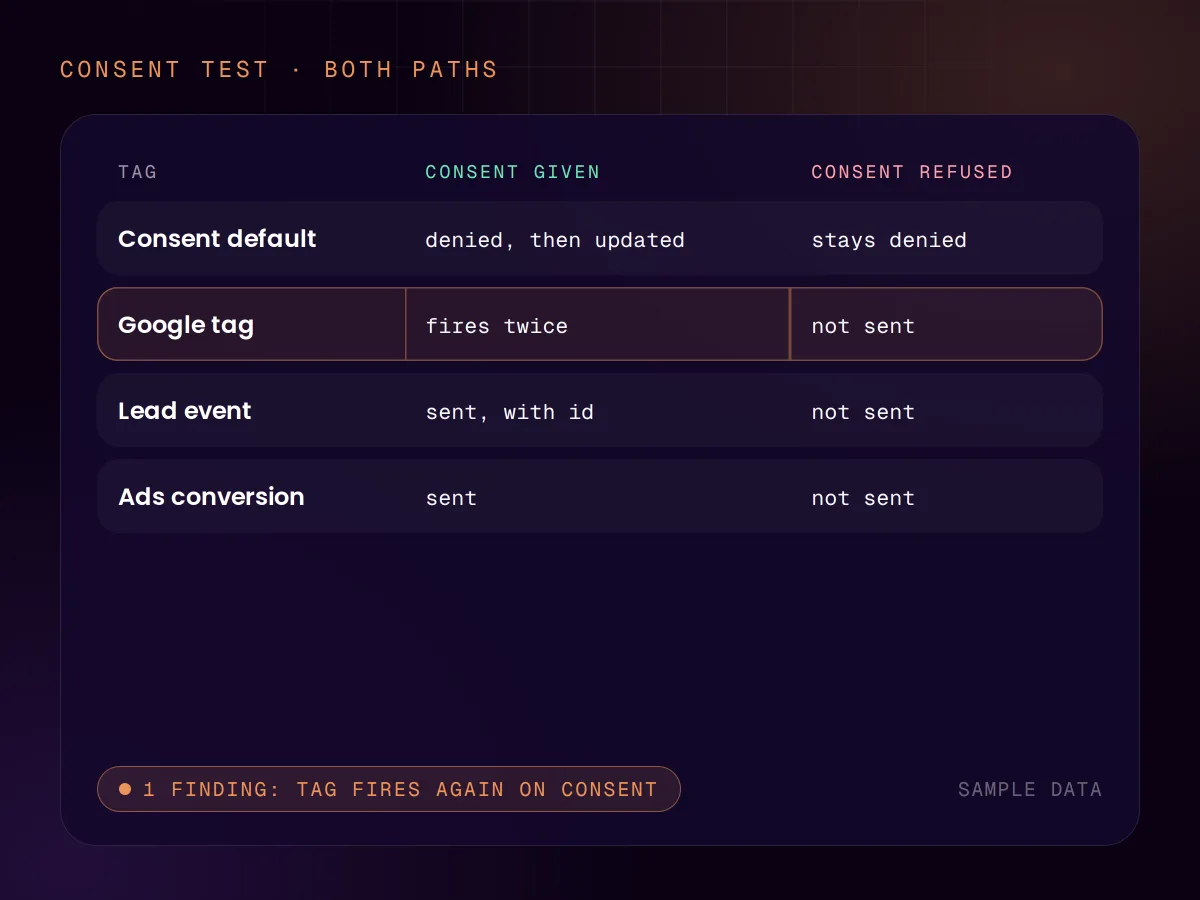
The main Google tag fired again when a visitor gave consent, sending a second page view for the same page.
The site sent one event name and the tag setup listened for another. The form worked. Analytics recorded zero.
No site passed a lead id, so a refresh, a double submit or a retry could count the same lead again.
Phone and WhatsApp buttons in a sticky mobile footer sent nothing at all.
A setup cloned from another site still carried the old site’s tags, sending clicks to the wrong property.
What we look at
Consent Mode
Of the consent signals Google’s tags read, four cover advertising and analytics: ad storage, ad user data, ad personalisation and analytics storage. How your banner sets them decides what you can measure. In basic mode, tags do not load until the visitor chooses, and a refusal sends Google nothing. In advanced mode, tags load at once and send measurements without cookies while consent is refused.
Most setups are tested once, with everything accepted. We test both paths, on every page type, and check what is sent in each. The choice between basic and advanced is yours to make, with your privacy adviser: we show what each one costs in data.
A second count
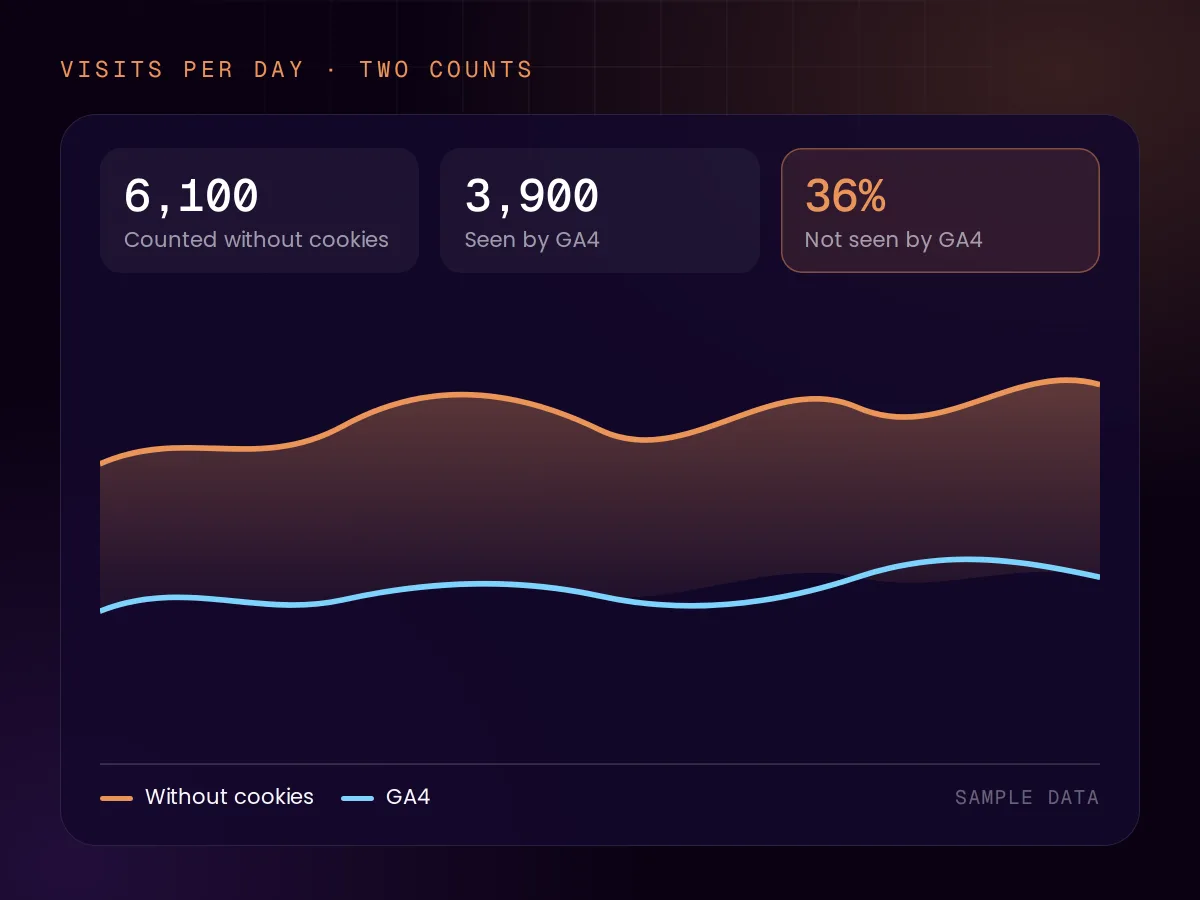
We run our own pageview counter next to Google Analytics. It stores nothing in the visitor’s browser, so where the rules in your market allow it, it can also count the people who refuse the banner. Put next to GA4, it shows how much of your traffic GA4 does not see. We process the counts on your behalf.
We do not call it exempt from consent. The Dutch privacy authority says limited analytics with little or no privacy impact needs no consent, while the UK and French regulators attach conditions such as a way to object. We check the configuration against those conditions for your market.
Conversion optimisation
A test on a conversion event that counts twice measures nothing, so conversion work starts with the measurement. Then we review the pages for what stops people: a form that fails, a button nobody sees on a phone, a path that ends nowhere. Those get fixed without a test.
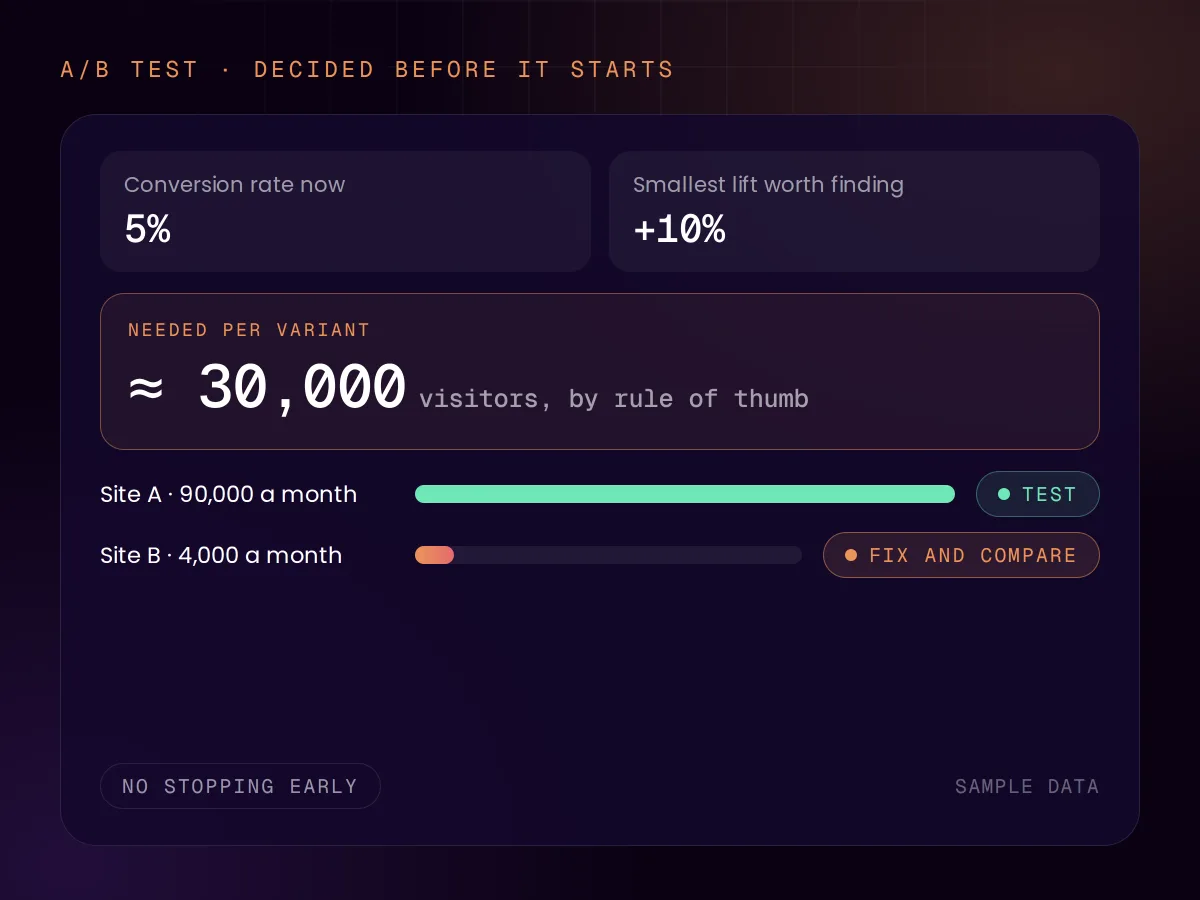
For sites with enough traffic we run A/B tests, built into the site’s own code. Enough is more than most people expect. By a common rule of thumb, detecting a 10% relative lift on a 5% conversion rate takes about 30,000 visitors per variant. We set the sample size before the test starts and do not stop early: checking a running test again and again can turn a 5% false-positive rate into 26%.
Sources: Google, consent mode (opens in a new tab), Google, EU user consent policy (opens in a new tab), Autoriteit Persoonsgegevens, cookies (opens in a new tab), ICO, exceptions to consent (opens in a new tab), CNIL, audience measurement (opens in a new tab), Evan Miller, How Not To Run an A/B Test (opens in a new tab), Optimizely, how long to run an experiment (opens in a new tab)
Consent mode
| Question | Basic mode | Advanced mode |
|---|---|---|
| When do Google’s tags load? | Only after the visitor chooses. | When the page opens. |
| What is sent after a refusal? | Nothing, not even the consent status. | Measurements without cookies. |
| Can Google model the missing visitors? | No: behavioural modelling in GA4 needs the advanced setup. | Yes, above the traffic thresholds. |
| Who should decide? | You, with your privacy adviser. | You, with your privacy adviser. |
As described in Google’s documentation on 15 November 2026. This is general information, not legal advice.
Sources: Google, consent mode (opens in a new tab), Google, behavioural modelling (opens in a new tab)
What we set up
Sources: Google, server-side tagging (opens in a new tab), Google, why server-side tagging (opens in a new tab)
How we work
01 · Audit
Three sources side by side: the tag setup, the site’s code and the live data. The audit is read-only.
02 · Plan
What loses data today comes first. You get each finding with its evidence and the fix.
03 · Fix
One vocabulary, one lead id, tags that fire once. In your own accounts, never in ours.
04 · Verify
We compare what analytics now reports with the server count, with consent given and refused.
Tracking audit
From €500
Fixed and agreed before we start. The fixes are quoted from the findings, because their size depends on what the audit turns up. For UK clients we quote in pounds on request. See all pricing
FAQ
Reviewed by Chris de Gruijter,
Further reading
We also do
Start with the free AI Scan, or ask for a tracking audit straight away.